

iCal Sync for Airbnb Cleaning: What It Is and Why You Need It
Every time a guest books one of your properties, somebody needs to clean it before the next person checks in. And every time you’re the one copying dates from Airbnb into a spreadsheet or texting your cleaner manually, you’re doing work that a computer should be handling.
iCal sync is how you stop doing that work. It connects your booking calendar to your cleaning tool so turnovers get created and assigned automatically when guests book, cancel, or change their dates. No spreadsheet. No copy-pasting. No forgetting about that Tuesday checkout because you were dealing with a guest complaint on a different property.
If you’ve heard the term but aren’t sure how it actually works or how to set it up, this is the post for you.
What iCal actually is
iCal is a calendar format — a universal standard that lets different apps share calendar data with each other. Its actual name is iCalendar (or .ics), and it’s been around since the late ’90s. When you export a calendar from Airbnb or import one into Google Calendar, you’re using iCal.
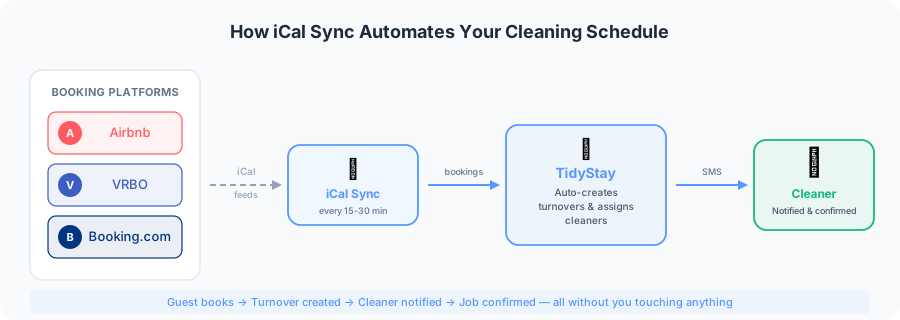
The way it works for vacation rentals: Airbnb, Vrbo, Booking.com, and basically every other booking platform lets you export your reservation calendar as an iCal feed. That feed is just a URL. Anything that understands the iCal format can read that URL and pull in your bookings — check-in dates, checkout dates, guest names (sometimes), and reservation status.
You might already be using iCal without realizing it. If you’ve ever synced your Airbnb calendar with Vrbo to avoid double bookings, that was iCal. The same mechanism that prevents double bookings can also be used to trigger cleaning schedules.
Why it matters for cleaning
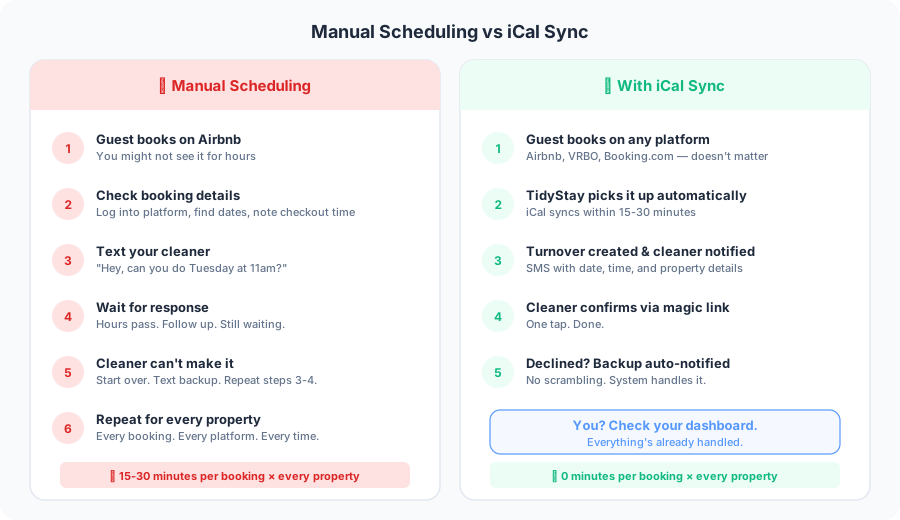
Without calendar sync, your cleaning workflow looks like this: a booking comes in, you notice it (hopefully soon), you check when the guest is checking out, you figure out who’s cleaning that property, you text them the details, and you hope they respond and show up. Multiply that by however many properties and booking platforms you manage.
With iCal sync, the workflow collapses to: booking comes in, cleaning tool picks it up, turnover is created, cleaner is notified. You find out when you glance at your dashboard and see everything’s already handled.
The difference gets bigger as you scale. Managing cleaning for two properties across one platform — sure, you can do that manually. Managing eight properties across Airbnb, Vrbo, and Booking.com? Manual scheduling becomes a part-time job. One that doesn’t need to exist.
How to get your iCal URL
Every major booking platform gives you an iCal export URL. Here’s where to find it.
- Airbnb
Go to your listing → Calendar → Availability settings. Scroll to “Connect calendars” or “Export calendar.” Copy the URL starting with https://www.airbnb.com/calendar/ical/...
- Vrbo
Go to your property dashboard → Calendar → look for “Export calendar” or “iCal link” in settings. The URL usually starts with https://www.vrbo.com/icalendar/...
- Booking.com
Log into your Extranet → Rates & Availability → “Sync calendars” or “iCal export.” Copy the provided URL.
- Using a PMS?
If you use OwnerRez, Hostaway, or Guesty, get a single iCal feed from the PMS itself. It already aggregates all your channels so you only need one URL per property.
Save these URLs somewhere safe before you close the tab. They’re long and easy to lose track of.
Connecting iCal to TidyStay
Once you have your URLs, the setup takes about two minutes per property. Go to your property settings, find the calendar sync section, and paste in the iCal URL. TidyStay starts pulling bookings immediately and checks for updates every 15–30 minutes.
When a new booking appears in the feed, a turnover is created for the checkout date. When a booking is cancelled, the turnover is removed. When dates change, the turnover adjusts. If you have multiple feeds for the same property — one from Airbnb, one from Vrbo — add them all. TidyStay deduplicates so you don’t end up with multiple turnovers for the same checkout.
Once a default cleaner is assigned to a property, every new turnover notifies them automatically via SMS. You don’t touch anything.
iCal vs direct PMS integration
iCal works well for most hosts, but it has one limitation worth knowing: it syncs on a schedule, not in real time. When a guest books on Airbnb, the iCal feed might take 15 minutes to an hour to update depending on the platform.
| Feature | iCal sync | Direct PMS integration |
|---|---|---|
| Setup time | 2 min per property | 15–30 min, one-time |
| Works with | Any booking platform | OwnerRez, Hostaway, Guesty |
| Update speed | 15–30 min delay | Real-time via webhook |
| Same-day bookings | May miss lead time | ✓ Yes |
| Best for | 1–5 properties, typical patterns | Larger portfolios, high last-minute volume |
Common issues and how to fix them
Most iCal problems fall into a few categories.
Bookings aren’t showing up. Most likely a stale or truncated URL. Go back to the platform, re-copy the full URL, and paste it in fresh. Also check that calendar export is enabled — some platforms require you to toggle it on.
Duplicate turnovers. Usually means you’ve added the same feed twice, or you’re using both a PMS feed and the individual platform feeds. If your PMS already aggregates everything, use the PMS feed only.
Cancelled bookings still showing. Give it a few hours — iCal feeds represent the current state and should clear on the next sync. If it persists, try removing and re-adding the feed URL.
Wrong dates on turnovers. iCal provides dates but not always specific times. Check that your property’s checkout and check-in times are set correctly in TidyStay — those times determine the actual turnover window.
Getting the most out of calendar sync
A few things that make a big difference once it’s running.
Set your check-in and checkout times accurately on every property. These determine when turnovers appear on your cleaner’s schedule. If your actual checkout is 11am but your system says 10am, your cleaner shows up an hour early to a property where the guest is still in bed.
Assign a default cleaner to every property. When iCal creates a turnover automatically, it needs to know who to notify. Without a default, the turnover sits unassigned until you manually deal with it — which defeats the point of automation.
Set up a backup cleaner per property too. When your primary declines or doesn’t confirm, the backup gets notified automatically. This one setting eliminates most last-minute scrambles.
Check your dashboard once a day. Automation handles 90% of the work, but a quick glance catches anything that needs attention — unconfirmed jobs, tight turnaround windows, properties without an assigned cleaner.
The bottom line
iCal sync is the foundation of any automated cleaning workflow. It removes the manual step of checking bookings and creating cleaning tasks — which is exactly where things go wrong most often. Forgotten turnovers, wrong dates, cleaners who don’t get notified in time.
Setting it up takes a few minutes per property. Once it’s running, bookings flow into turnovers, cleaners get notified, and you spend your time on things that actually need your attention instead of playing calendar coordinator between platforms and people.
Everything else — checklists, photo verification, payment automation — builds on top of having your booking data flowing automatically.
Connect your calendars in minutes
iCal sync is free on all TidyStay plans. First property free, no credit card needed.
Get started free